Using the History Playback Bar
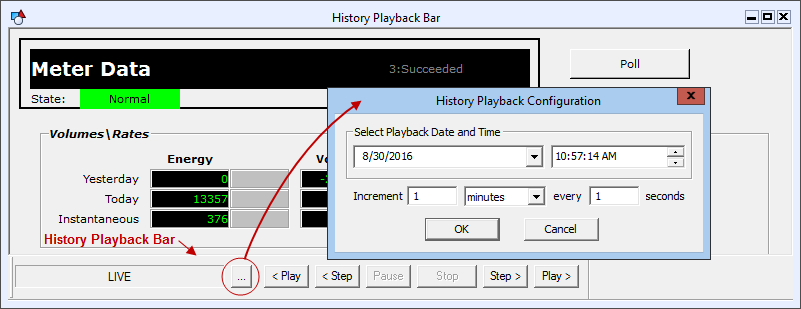
The History Playback Bar allows a screen to be "replayed" using historical data rather than current values. The History Playback Bar has options to continuously stream historical data or step incrementally through it.
The History Playback Bar is a property of TheView. When this property, [EnableHistoryPlayback], is set to true, a user can show the playback bar by right-clicking on TheView in Run mode and clicking Show History Playback Bar. When display of the playback bar is enabled, it is shown on the bottom of the view.
The Step and Play rate is configured in Run mode. The default rate is 1 minute of data every 1 second (streaming) or every click (step). The timestamp of the request is shown on the History Playback Bar. When the screen is in live (current values) mode, the field displays LIVE. Clicking Stop takes the screen back to live (current values) mode.
Note: The request time is not necessarily the timestamp of the data. The data will be the closest to without exceeding the requested date.
|
History Playback Bar |